User interface for your entire school IT system | VS

Last search queries

User interface for your entire school IT system | VS

schooladmin the edtech suite for digital schools

No logging in here, no tools there, no “hang on, where was that again?” Instead: everything in one place, all just a click away. Sounds almost too good to be true? That’s exactly what schooladmin is.


schooladmin the edtech suite for digital schools

No logging in here, no tools there, no “hang on, where was that again?” Instead: everything in one place, all just a click away. Sounds almost too good to be true? That’s exactly what schooladmin is.
schooladmin the edtech suite for digital schools

No logging in here, no tools there, no “hang on, where was that again?” Instead: everything in one place, all just a click away. Sounds almost too good to be true? That’s exactly what schooladmin is.

schooladmin the edtech suite for digital schools

No logging in here, no tools there, no “hang on, where was that again?” Instead: everything in one place, all just a click away. Sounds almost too good to be true? That’s exactly what schooladmin is.
schooladmin is a software solution that brings together everything a school needs in the digital realm: device management, lesson management, communication, user management, data protection and IT administration. Instead of 5 different tools with 5 different passwords, there is just one login.

What is schooladmin?

schooladmin is the only modular all-in-one solution that combines teaching, school IT, organisation and operations within a unified architecture. The platform brings together three levels:

  1. Teaching & Learning (educational level)
    Digital tools for teachers and pupils must work – simply, reliably and without technical hurdles.
  2. School organisation & communication (administrative level)
    User management, roles, processes, school structures – everything must be clearly mapped and automated.
  3. IT Infrastructure & Operations (technical level)
    Devices, networks, operating systems, security – highly complex, often built up over time and resource-intensive.

In reality, these three levels are often conceived and operated separately. This is precisely where problems arise. That is why schooladmin breaks down this separation and integrates everything into a consistent system architecture.

schooladmin combines educational freedom with maximum technical security consistently adhering to the zero-trust principle.

What specific benefits does schooladmin offer me?

#
For schools and school administration
There is now just one platform for accessing the administrative and educational networks. All devices – whether Windows PCs, iPads or pupils’ personal devices – run on the same educational interface, in compliance with data protection regulations. Software updates are installed automatically overnight. Backups are performed at set intervals. Even the change of class or year group at the start of the school year can be handled intuitively at the touch of a button.
#
For teachers
You log in to schooladmin in the morning and then have simultaneous access to your emails, the school calendar, your teaching materials, learning platforms such as Moodle and Microsoft 365, and the GDPR-compliant messenger. During lessons, you can see all the pupils’ screens on your own screen. If necessary, you can block individual websites, stop an application, or mirror your screen or a pupil’s screen to all other devices. You can also use the platform to communicate with your pupils outside of lessons, for example to set and mark assignments. Tests are conducted digitally in a tamper-proof manner.
#
A girl is looking at a tablet
For learners
With just one login, you can access your data and materials from anywhere – whether from a PC, tablet or smartphone, at school, at home or on the go. You can collaborate on documents with others at any time, securely and in compliance with data protection regulations. Your teachers post assignments via the platform. You work on them and submit them with a timestamp. Feedback and corrections are also sent to you via the platform or, if preferred, via chat. During exams, the platform determines which programmes and websites you are permitted to use whilst working.

What else sets schooladmin apart

AI-powered content filtering on the school server. schooladmin continuously scans all image, text and video files stored on the school server using artificial intelligence to detect content unsuitable for minors – automatically, in the background, with no manual effort required. There’s nothing else quite like it.

DeployGuard. If something goes wrong during software deployment – a device is offline, a job fails – schooladmin detects this automatically, bypasses the problem and continues the process independently.

Reset function. If a device is rendered unusable due to faulty software, an authorised person can restore it with a single click. This also applies to the entire school year transition: simply reset a faulty import, import the corrected data, and restart.

One login for both networks. The administrative netwrk and the educational network are separated for data protection reasons. With schooladmin, teachers can still use both networks with the same account. The network-side separation remains fully intact.
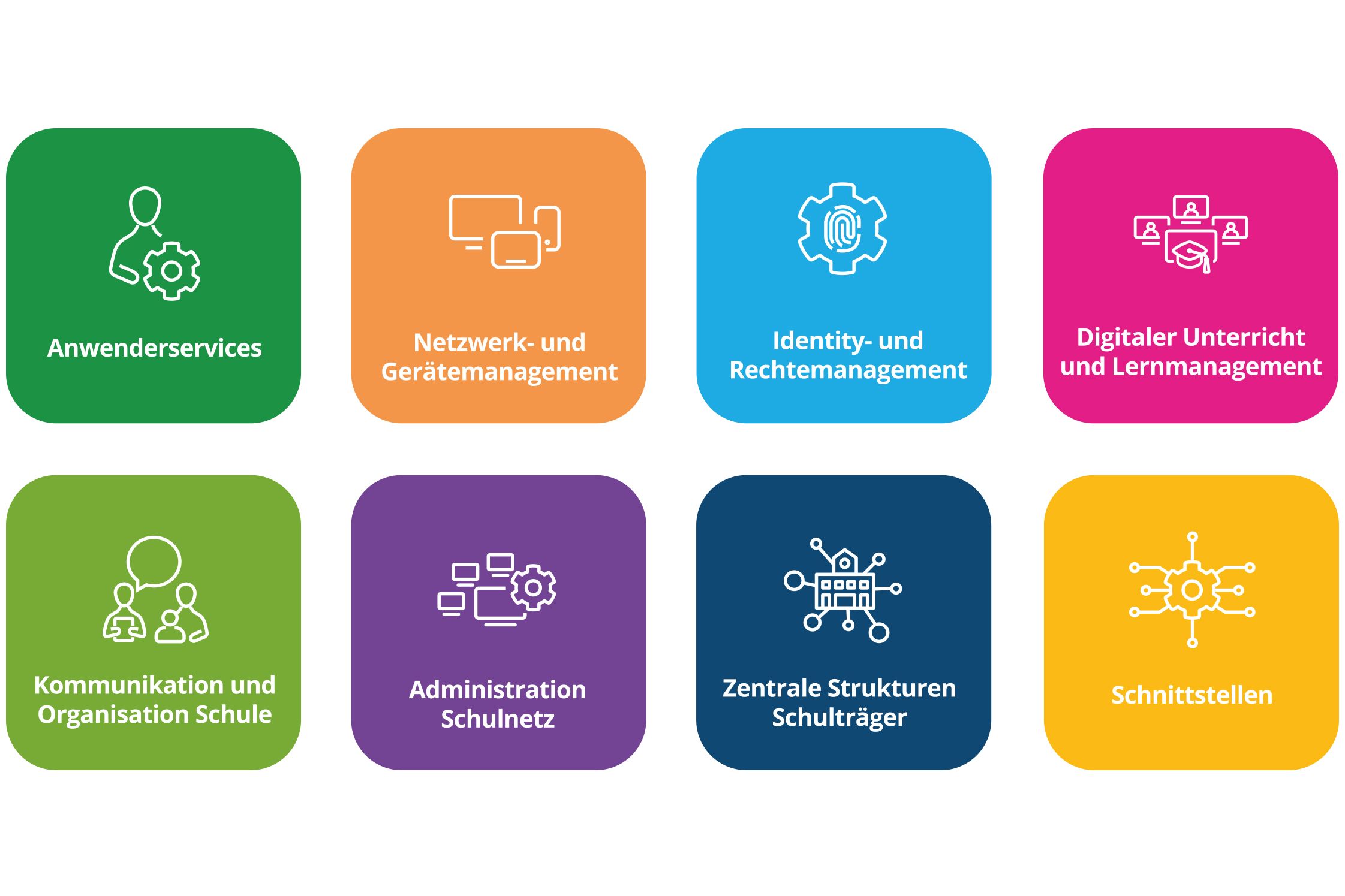
schooladmin – Features and Specifications
IT operations, user administration, device management, digital teaching and communication – schooladmin brings together all the functions of a digital school in a single system. For school authorities, this means centralised management, less effort and full control. For schools, it means more teaching and less IT-related stress.

How does it all work?

.At the heart of the system is a Windows server. It can be located directly within the school or operated via a data centre. schooladmin runs on it as a central system, connecting all of a school’s devices, users and processes.

The so-called middleware acts as an intermediary between the various roles within the school (teachers, IT coordinators, administrators) and the technical infrastructure. Complex IT tasks are therefore carried out fully automatically in the background. Anyone wishing to control a printer, set up an iPad or block internet access for a class can do so with a single click; no IT knowledge is required.

Integrating a new device takes about a minute. Operating systems are installed automatically, drivers are detected automatically and software is distributed automatically, without anyone needing to be present.

Several students work together at a table using laptops and tablets. Two young people focus on their devices while exchanging ideas. The image is AI Generated.

Who is schooladmin suitable for?

School levels

The platform is designed to adapt to the school’s requirements. A small primary school with twenty iPads benefits just as much as a large comprehensive school with several hundred devices across different locations.
School authorities

School authorities can centrally manage all affiliated schools via the Central Site Management (CSM) component. This eliminates the need for time-consuming individual support for each site.


schooladmin – alle Funktionen im Überblick (available in German only)
VS General Document
VS General Documentpdf2 MB

Curious about schooladmin?
We offer schooladmin in partnership with our Specific Alliance Partner kraft network engineering. If you’d like to find out more about the software or are interested in a demo, please get in touch.

You may also be interested in

#
A primary school classroom with free-form tables Puzzle and the interactive whiteboard MediaPilon by VS
Switch from analogue to digital blackboard systems
The interplay of analogue and digital board systems creates a seamless connection between traditional learning and modern, interactive methods.
#
A father draws with his child on an interactive display by VS
Digital learning – where are the giant leaps?
New technology demands new methods, says Jörn Muuß-Merholz. The media expert shows how innovative learning could be – and why schools have problems with it. 
#
Your complete package: everything fits, everything works. Perfectly combined.
Are you looking for a perfectly coordinated system for teaching, presentations, or meetings? We not only supply the right display, but also the complete mounting system, all accessories, and practical training for a turnkey package without compromise.
Spread the word – arouse interest
Share this page and arouse interest in others.